When Frank’s father died, the hardest lock was not the safe. It was the email account.
There was no notification list, no password trail, no record of which services the account controlled. The bank sent a reset link nobody could open. The utility company wanted a code from an inbox nobody could reach. Three weeks of customer-service calls followed, and most of them ended the same way: we can’t help you.
Nothing about that ordeal required a death. A hospitalization would have produced it. So would incapacity, or a simple lost phone. The lock was already built; the family just had not hit it yet. And the account at the center was not the bank account, the brokerage account, or anything with money in it. It was the free email address his father had used for fifteen years.
What happens to your email when you die?
By default, nothing orderly. The account keeps running while everything that routes through it starts to lock: password resets bounce, statements go unread, and the one account that resets all the others slowly seals them instead. What happens next depends entirely on whether anyone can reach the inbox and wind it down on purpose.
A primary email account works the way a master key works in an old office building: it holds no valuables itself, but it opens every door on the hallway. Banking, cloud storage, subscriptions, the pharmacy portal, tax software, and often other email accounts all route their password resets through it. Control the inbox and, given time, you control nearly everything downstream. Lose the inbox and everything downstream starts locking behind it.
We have written before about where the master password belongs. That rule governs the key to your Vault. This is the companion problem: the master account, the address every other service trusts when someone clicks “forgot your password.” A lost master password seals one container. A lost master account seals a hallway of them, slowly, one failed reset at a time.
There is a second reason this account deserves attention now rather than someday. The people who take over accounts rarely bother guessing passwords anymore. They work the reset path instead: patient, convincing, well-rehearsed requests aimed at whoever answers, whether that is a support representative or a distracted family member. The recovery chain is the real architecture of your family’s digital identity — and almost nobody has ever drawn it.
First move: map the recovery chain
The FIRM System (FIRM stands for Family Information Resource Management, the organizational system at the heart of The Recoverable Family) answers with two moves, one for the living account and one for its eventual end.
The first belongs to the Identities Module: map the recovery chain. An email recovery chain is the linked set of accounts, phone numbers, and backup codes that can reset one another, with your primary email at its center. Which account resets which? Sit down with your primary email and trace it in both directions. What resets the email itself: a phone number, a backup address, printed one-time codes? And what does the email in turn reset? Note where the chains loop, as when two email accounts each name the other as the backup.
Then harden the weak links the map reveals. A security question whose answer sits in a public obituary. A backup phone number from two jobs ago. A recovery address at a provider that no longer exists, waiting for a stranger to re-register it. Each weak link is a door on the hallway that opens for someone with patience. The map does not need to be elaborate: one page listing each account, what resets it, and what it resets is more than most families have ever had.
Second move: write the sunset plan
The second move belongs to the Digital Legacy Module: decide, in advance, how the account winds down when its owner no longer can. The FIRM System calls this a sunset plan, and it runs in a deliberate sequence.
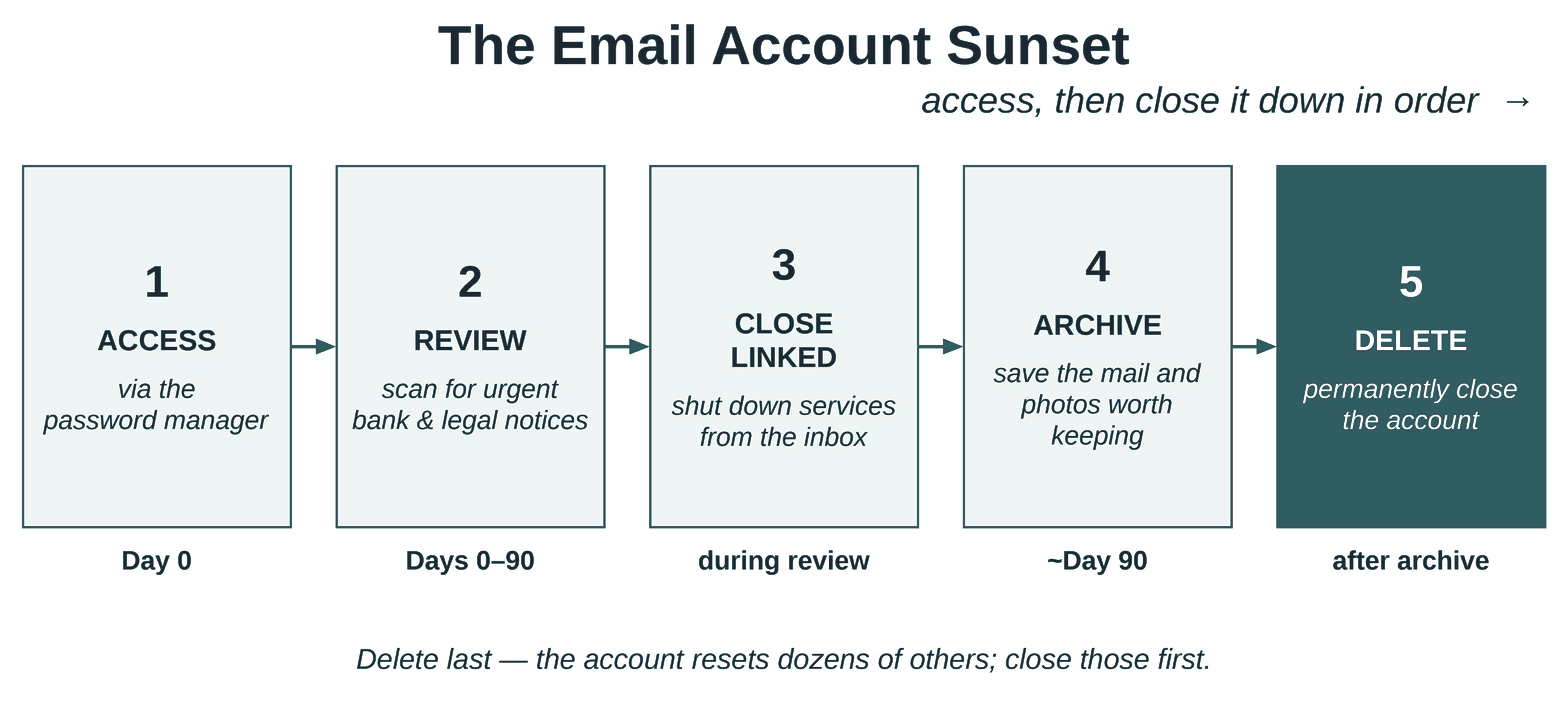
Emergency access comes first: a trusted person reaches the account through the password manager, under the same Vault practices your family already uses. That one step is the difference between accessing a deceased parent’s email account in minutes and pleading with customer service for weeks. Then a review window of ninety days, in which the inbox simply runs while statements arrive, renewals surface, and the full list of connected services reveals itself. Then close those connected services deliberately, migrating what matters to its new home. Then archive what the family wants to keep. Only then, delete.
The sequence is the point. A family that deletes first loses the ability to reset every account it has not yet found. A family that never deletes leaves an unwatched identity sitting online indefinitely. The sunset plan is what makes the in-between a plan instead of an accident.
Two supporting notes. Most major platforms now offer built-in transfer switches: settings that let you name, in advance and through authenticated channels, who may access or close an account when you cannot. They turn the handoff from a persuadable phone call into a verified process; setting them is its own project, worth its own unhurried sitting. And whether anyone in your family holds the legal authority to act on these accounts at all is its own question, one your estate documents, not just your will, should answer.
Tonight’s first step
Open your primary email account’s security settings and read the recovery options listed there. That is the whole assignment. If one of them is a phone number you no longer carry or an address you no longer control, you have found the first weak link in your family’s recovery chain, and fixing it takes minutes, not evenings.
Where this lives in the FIRM System
Both moves live in Area of Focus 2: At-Home. The Identities Module documents the identity: the accounts, the recovery chain, the hardened map. The Digital Legacy Module decides its disposition: the sunset sequence and who carries it out. The Vault holds the keys to all of it. And the Family Guide tells your family where to start without revealing any of it, which is exactly the balance a master account demands.
Frank’s family lost three weeks to one undocumented inbox. Yours can lose nothing at all. Where would your family land today: Emerging, Developing, or Recoverable? The Self-Assessment answers in about two minutes.